
Lorivelle for Mac

A screen recorder and video editor for Mac

Record your screen, edit your footage, and create polished demos with automatic zooms and smooth cursor movement

Download for Apple Silicon

Free recording and editing for Mac. A license is required to save and export. Requires macOS 15+ and Apple Silicon.

For Macs with Apple Silicon, macOS 15 or later. No subscription required · 1 year of updates · Keep included versions forever

  • Automatic zooms
  • Smooth cursor
  • Built-in editing

Your finished video. Your editor.

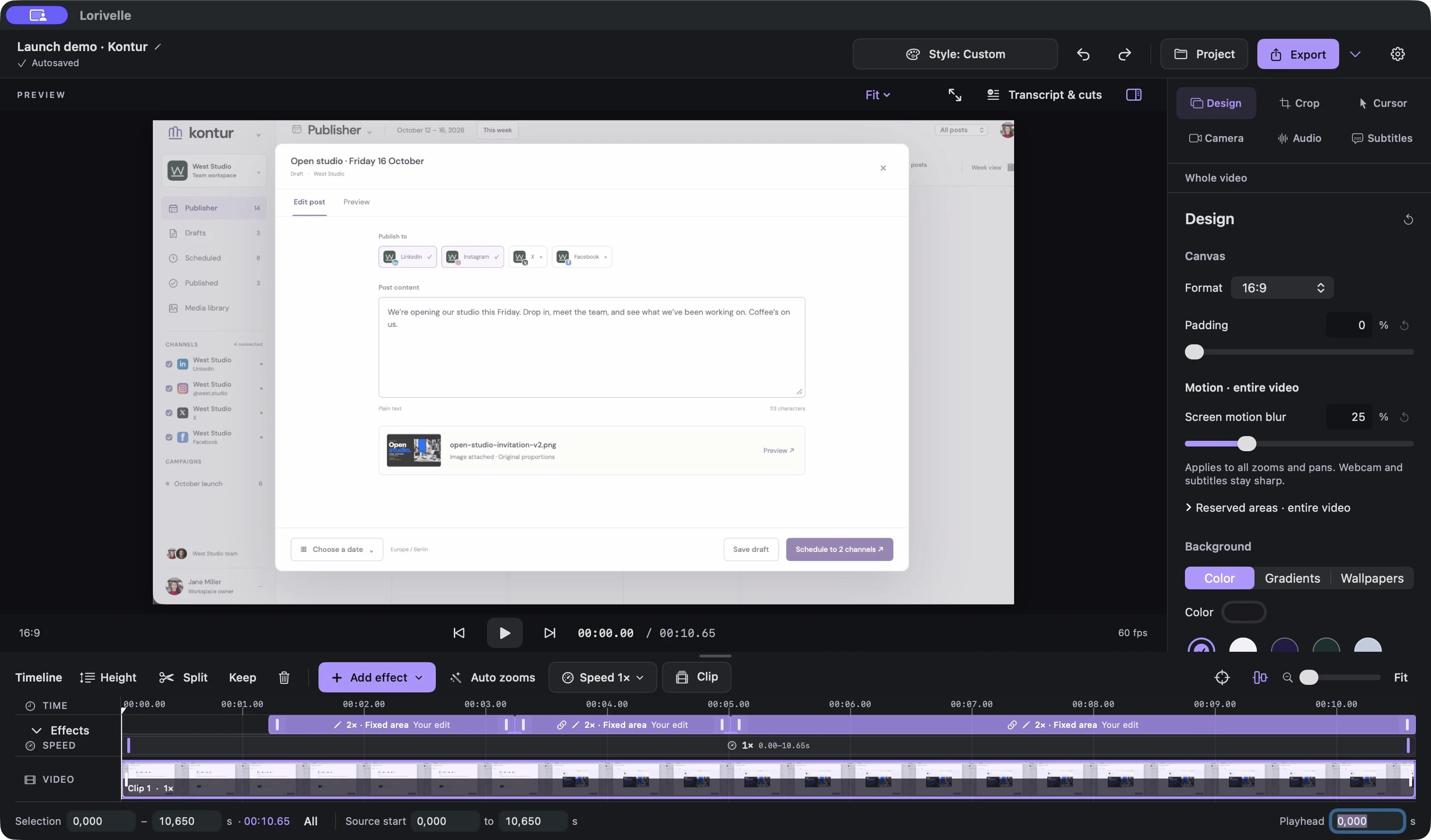
Lorivelle editor with preview, design controls and an editable zoom timeline
Watch the full demo · 35 sec

From recording to ready.

  1. Record
  2. Auto draft
  3. Refine
  4. Export
Current editor · 24 seconds

Generate a camera draft, refine a focus area, review the video and export.

KEEP THE IMPORTANT PART IN VIEW

Close to the action.
Easy to follow.

Help viewers see the click, read the detail and follow the result. Connected zooms move between actions without pulling back to the whole screen every time.

  • A useful first draft. Generate Subtle or Focused zooms from your recorded mouse track.
  • A clear next step. Refine the focus area and connect adjacent zooms. Choose Calm or Direct movement.
Explore camera controls ↗
Kontur · Connected focus areas, rendered by Lorivelle.

Your camera. Your screen. Your story.

Introduce yourself, explain the workflow, then give the result the whole screen. Add layout blocks where you need them; Lorivelle animates the transitions between four layouts.

Camera layouts 17 seconds
One recording. Four ways to tell it.
Explore screen and camera layouts

The same recording first without styling, then with a background, rounded corners and a shadow. The comparison plays automatically.

Your recording. Your style.

Add a background, round the corners and save your style for the next video.

Explore video styles ↗

Your story.
In a few clear lines.

Keep your demo clear with editable subtitles.

See the editing workflow ↗

SOUND AS CLEAR AS YOUR DEMO

Your voice.
Clearly heard.

Listen to the difference

Your voice, unenhanced.

Same recording, matched loudness. Background noise added for comparison.

More tools. Better videos.

From the first take to the finished file, make every detail work for your video.

Recording

  • Screen or selected area

    Capture a whole display or draw a precise area around what you want to show.

  • Pause and resume

    Take a break, tidy up and carry on in the same recording.

  • Countdown

    Give yourself a moment to get ready before the recording starts.

  • Voice and system audio

    Record your voice and capture sound from all apps or just the ones you choose.

  • Camera and mic check

    Preview your webcam and check microphone levels before you start.

  • Import an existing video

    Bring an MP4 or MOV into the editor and keep the original file untouched.

Editing

  • Cut and trim

    Trim the ends, split a clip or remove a pause with frame-by-frame control.

  • Change the pace

    Slow a moment down or speed up a section, from 0.25× to 8×.

  • Crop your recording

    Keep the part you need. Adjust the crop in the preview or enter exact dimensions.

  • Privacy blur

    Cover sensitive details with a blur that appears only where you need it.

  • Highlight and text

    Draw attention to a detail and add a short note to explain the next step.

  • Noise reduction & Podcast

    Choose Original, Noise reduction or Podcast. Clean up your voice locally and keep your original recording.

  • Automatic captions

    Turn English or German speech into editable subtitles, locally on your Mac. Correct the words, timing and style.

Cursor & camera

  • Automatic click zooms

    Start with smooth zooms generated from your recorded clicks. Choose Subtle or Focused, then edit any zoom.

  • Cursor smoothing

    Soften the movement between clicks while keeping the click positions precise.

  • Cursor motion blur

    Add subtle blur to the moving cursor while your screen content stays sharp.

  • Cursor visibility

    Leave the pointer out of a selected section, or hide it throughout the video.

  • Webcam positioning

    Pick an anchor or drag the camera in the preview to keep your product visible.

  • Camera size and shape

    Adjust its size, rounded corners and mirroring, or hide it for part of a clip.

Sharing

  • MP4 and GIF

    Export a finished MP4 or a looping GIF for your page, post or tutorial.

  • Export quality presets

    Choose a profile for the web, social or a presentation, up to 4K at 60 fps.

  • Video formats

    Set your canvas to 16:9, 9:16, 1:1 or 4:5 to fit where the video will appear.

  • Frame and background

    Choose gradients, wallpapers or your own color. Adjust padding, rounded corners and shadow, or add a mobile frame.

  • Clipboard export

    Export to your clipboard, then paste the video into apps that accept files.

  • Editable projects

    Save the source footage and your edits together, ready for the next version.

SHARE WITH CONFIDENCE

Keep details private.
Make the next step clear.

Blur a name, an email or an account detail after recording. Highlight a button or area when you want the viewer to focus.

Your edit, your timing. Move and resize each effect, then set when it appears. Everything stays editable.

See how to blur a recording

A blur covers the assignee. The rest stays readable.

Buy once — €79

OPTIONAL · WITH THE INCLUDED CODEX SKILL

Your direction.
An extra pair of hands.

Use Lorivelle’s editor yourself, or ask Codex to help plan, record and refine a demo. The project stays editable. You review the result.

EXAMPLE BRIEF

Record a short walkthrough of my app. Show one useful workflow and its result. Use focused zooms, keep the clicks in view and trim the pauses. Save the editable Lorivelle project and an MP4 for my landing page.

Install the included skill first. Replace “my app” with your product and the workflow you want to show.

Get the included skill ↗

Requires Codex and Mac control for recording. Codex access is separate.

The Codex skill is included with your license.

Simple pricing.

Prices in EUR. All features included. Buy once and keep your included versions.

One-time

€79 paid once

Keep your included versions forever. Includes one year of updates.

  • Automatic camera drafts & connected zooms
  • Four animated camera layouts
  • Cut, trim and change speed
  • Blur, highlights, text and automatic captions
  • Reusable video styles, backgrounds & frames
  • Project saving and MP4 / GIF export
  • Local noise reduction & Podcast mode
Buy once — €79

Monthly

€16 / month

Cancel anytime. Access continues until your paid period ends.

  • Automatic camera drafts & connected zooms
  • Four animated camera layouts
  • Cut, trim and change speed
  • Blur, highlights, text and automatic captions
  • Reusable video styles, backgrounds & frames
  • Project saving and MP4 / GIF export
  • Local noise reduction & Podcast mode
Subscribe — €16/month

Record and edit for free. A license unlocks saving and export. For Macs with Apple Silicon, macOS 15 or later.

Try Lorivelle before you buy

What can I try for free?

Download Lorivelle, record your screen, and try every editing tool. A license unlocks project saving and video export.

What happens after the update year?

Your one-time license keeps working with the versions released during your included year. You can keep using them forever.

Questions & answers.

Another question? Get in touch
Do I need Codex to make a video?

No. Recording, automatic drafts, editing and export work in Lorivelle. The included Codex skill is an optional production workflow; it requires separate Codex access and Mac control for recording.

Will opening an older project change its look?

No. Opening an older project preserves its existing camera rendering. New camera behavior is activated when you explicitly edit or regenerate the affected zooms. Keep the original project when you want to compare versions.

Which Macs can run Lorivelle?

Lorivelle requires macOS 15 or later and an Apple Silicon Mac.

Are click zooms automatic?

Yes. New recordings start with Subtle zooms by default. Choose Off, Subtle or Focused in Settings, or open Auto zooms in the editor to generate a draft from a recorded mouse track. Review the draft, then adjust the focus area, strength and timing. Your own edits are kept when you generate again.

Can the zoom follow my mouse?

Yes. Select a zoom and choose Fixed area or Follow mouse. Follow mouse leaves room for small movements before the camera follows. Choose Calm or Direct movement, adjust the focus area in the preview, and connect adjacent zooms to move straight between targets.

Can I cut and speed up recordings?

Yes. Split, trim, remove a selection and change the speed of individual sections from 0.25× to 8×.

Does a mobile frame need a new recording?

No. You can crop a desktop recording and add a mobile frame. The frame styles your footage; it does not turn the recorded website into a responsive mobile layout.

What can I record?

Record your screen or a selected area, with optional camera, microphone and system audio. The editor includes separate controls for the recorded tracks.

Which export formats are available?

Export MP4 or GIF. In Use for, choose Website, Social Media, Presentation or Small file. Advanced settings let you adjust resolution and frame rate within the source recording’s limits. After export, copy the file, drag it into another app or show it in Finder.

Can I copy a finished video?

Yes. After export you can copy the finished file to the clipboard. Pasting a video file depends on the destination app.

Is my recording uploaded?

Capture, editing and export run locally on your Mac. No cloud upload is required for this workflow.

Can I hide details or crop the picture?

Yes. Place a timed blur over a chosen area, or adjust the crop while preserving the original recording.

Can I explain a step with text?

Add a timed highlight or text note. Generate editable captions from English or German speech locally, write them yourself or import an SRT file. Speech recognition works offline after one model download.

Can I switch the app language?

English is the default. Choose English or Deutsch in Settings. Your choice is saved for the next launch.

Show what your
product can do.

The next time someone asks “how does this work?”, give them a video worth watching.

Buy once — €79 For Macs with Apple Silicon, macOS 15 or later. Download for Apple Silicon

See Lorivelle in action.