
Your next recording starts here
Download Lorivelle for Mac
Turn a screen recording into a clear product demo, lesson or support answer. Record and edit for free, then choose a license when you want to save a project or export the finished video.
For Macs with Apple Silicon, macOS 15 or later. Local on your Mac.
No account or payment details needed to download.
From download to first take.
Install the Mac app
Download the DMG without an account and open it. Drag Lorivelle into Applications and open the app there.
Choose what to record
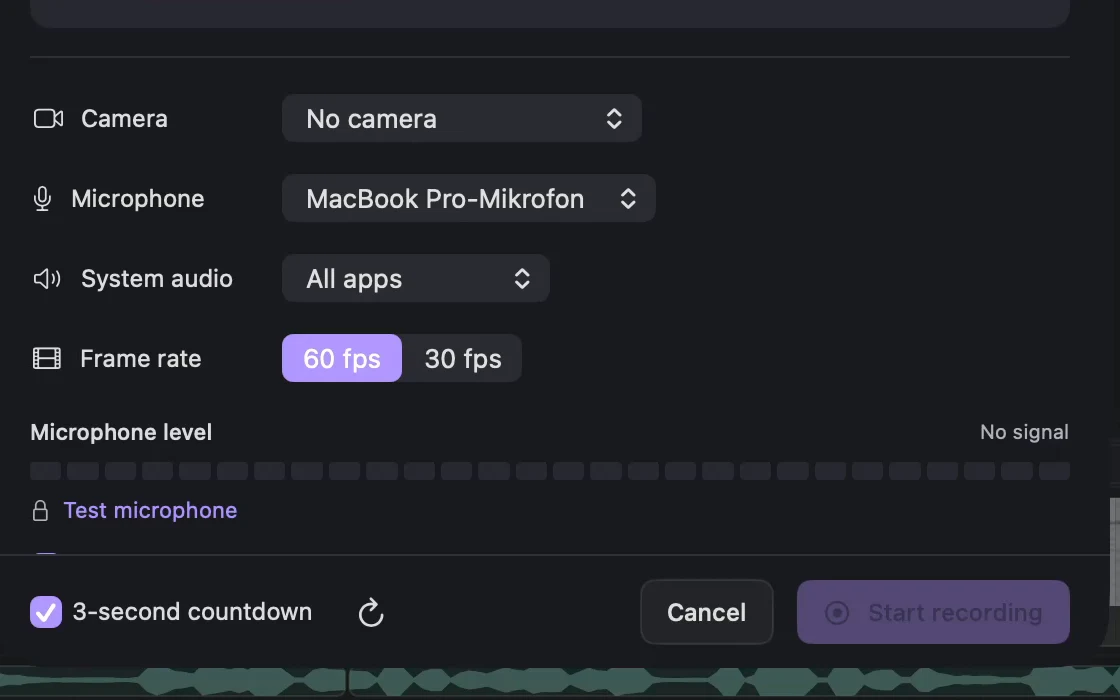
Select a display or area, add the microphone or application sound you need, and enable the webcam if you want a separate camera track. Allow the macOS permissions for your chosen sources.
Review a short recording
Play back a test take before making a longer demo. Refine the zooms, cuts and composition in the editor. Follow the first-recording guide.
Keep the work
A license unlocks saving and export.
Save the editable project for later changes and export the finished MP4 or GIF. Choose €16 per month or a €79 one-time purchase with one year of updates.
After payment, choose Activate in Lorivelle in your account. Confirm in your browser and the app receives your license automatically. A license-file import remains available. The one-time license lets you keep using your included versions after the update year.
Compare the two plansBefore you download.
What can I try without a license?
Download the app without an account, then record and edit for free. A valid license unlocks editable project saving and MP4/GIF export.
Does Lorivelle run on an Intel Mac or Windows?
Lorivelle requires an Apple Silicon Mac running macOS 15 or later. The Mac app does not support Intel Macs or Windows.
How do I activate after buying?
Choose Activate in Lorivelle in your account, then confirm in your browser. The app receives and verifies your license automatically. You can also import a license file under Settings → License. Recording and editing work before activation; saving and export require a valid license.
Can I work offline after activation?
Yes. The app processes recordings locally and checks your activated license offline. A monthly license remains valid through the paid period and refreshes when the app is online. With a one-time license, your included versions remain usable after the year of updates ends.